|

 MediNotes e EHR
Software Features MediNotes e EHR
Software Features
With so many electronic medical record
systems on the market today, it’s difficult to wade through the
features and functionality of each system to make sure that it fits the
needs of your busy practice. MediNotes e has been specifically designed
to stand out in the market, with a design that eliminates navigation
and makes multi-tasking a reality.
While other EMR systems are confusing and
require your staff to migrate from screen to screen for the right
information, MediNotes e is a fresh new EMR software design which
utilizes a “tab” concept for simplicity and ease of navigation. Just as
tabbed browsing is improving multi-tasking for internet users, tabs in
an electronic medical records allow you to multi-task like never
before. MediNotes e can display multiple patients, encounter notes,
workflow items, patient flow, messages, alerts, and more, all in
accessible tabs within the MediNotes e shell.
The entire program has been broken into just
four convenient views: Practice View, Patient View, Document View and
Object View. Each section contains pertinent information in an easy to
utilize hierarchical tree.
Nine out of 10 doctors Get it
Right the First Time with MediNotes e.

|
|
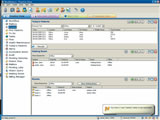
Practice View is a
global view of the events occurring withing the practice. It allows
your staff to review all of your: Patient/Practice Alerts, Messages,
Patientflow, pending lab results from reference laboratories, pending
histories from Instant Medical History, automated tasks and more.
|
Patient
View
|
|
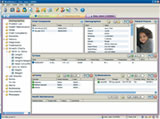
MediNotes e is able to
display multiple patients at a time, each with their own color coded
tab. Patient View screens can be completely customized by the office
with the data panels of your choosing. Panels can be organized into
nurse intake screens or comprehensive display screens. The MediNotes e
Panel Summary can be used to create printed patient summary sheets
based on the custom panel data.
|
Document
View
|
|
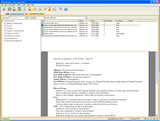
This global view
enables your office to quickly filter all of your MediNotes e documents
(by document type, provider or date) and then print to the specific
printer settings designated for that document type.
|
Object
View
|
|
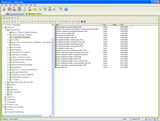
MediNotes e remains the
most customizable electronic health record on the market. The Object
View gives you the opportunity to review, customize and save templates
and examination dialogs in one convenient area.
|
Accessibility
- Accessible and organized patient folder
- Common/Topic/All Design makes it easy to
add information quickly.
- Document Management expansion module
Ease of
Use
- User-friendly design and consistent icons
allow users with limited computer knowledge to navigate the software
quickly.
- Only 3 main screens to learn for general
use - Patient Folder, Note Window, and Object Explorer.
- Option settings allow you to tailor the
program to your needs.
- Online help file is always available for
reference.
- Color indicators in the Patient Folder
define rows for a better at-a-glance viewing.
- Common lists in many of the history
dialogues allow you to define the choices that you use more often.
Comprehensive
Charting
- Single screen "What you see is what you
get" template - no need to move to a completely different screen to
enter subjective, objective assessment and plan
- Default phrasing makes it possible to
chart by exception
- Templates are completely flexible - you
can tweak the provided templates for the work in your practice
- Easy to document multiple chief
complaints
- Color coding for viewing at a glance
- Black Text - This is simply
text which has been hard-coded into the template.
- Blue Text - This is a default value for a pop-up window.
- Red Text
- This is an optional pop-up window that can be clicked if needed.
- Green Text
- This signifies that the user has activated the dialog and made a
change
- New Note from an Old Note
- Note on Hold
- Macros pull demographic or other stored
information directly into the note
- Prescription objects can be created and
embedded in templates for routine encounters, making it even easier to
create prescriptions
Graphic
Coding
Features
- ICD-9 and CPT codes
licensed from the AMA
- E&M Wizard suggests
appropriate codes based on the information documented
- Custom History of
Present Illness based on a Chief Complaint with E&M credit
Efficient
Workflow
- Enhanced Data
Repopulation for optimal efficiency
- Pull medical history
from the patient's record
- Pull object data
from a previous note
- Pull object data
that has been added to the patient's record without a note
- Daily Patient List -
allows the physician to quickly pull up the patient from the daily list
without having to search the entire patient list
- Interfaces with electronic scheduling
- Template Wizard makes it
simple to create custom templates for your practice
- Integrated Office
Tasks - just a few clicks
- Physician Referral Letters - In only 4
mouse-clicks you can create a professional letter to refer a patient,
or thank another physician for their kind referral. The letter includes
either the full patient note, or just the impression and plan sections
for their reference.
- Patient Instructions - Customized Patient
Instructions can be printed and sent home with the patient regarding
their care.
- Patient Letters - Similar to a referral
letter, the patient letter is simply a letter template that can be
printed and sent to your client.
- Physicians Orders - When an order has been
documented in the note, a worksheet can be printed to show what the
physician has ordered.
- Prescriptions - Create a script right from
the program using the extensive medical library. The information for
the script is also included at the bottom of the patient's note, and in
the patient's medications folder for easy and consistent reference.
- Custom script layouts
- Multiple scripts per page
- Drug Interaction Module
available*
- SuperBill Statements - The Billing Wizard
pulls the billing codes from the dialogs used in the exam
documentation. Simply associate the Diagnoses with the appropriate
Treatments, and print the SuperBill Statement. (Some of the billing
interfaces allow a direct transfer of this information to their program
- see Import section.)
- One of the most
flexible systems on the market
- Medical content is
infinitely customizable
- Templates promote
better, more comprehensive documentation
- Fields can be set as "required"
- Can be layout out in a
narrative or list format
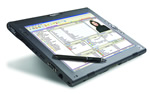
- Wireless enabled
- Tablet PC enabled
- Speech Recognition
enabled
- WAN through Citrix
or terminal services
- Full access
without a dial-up using the MediNotes e Synchronization module
- Synchronization allows remote
users to access a full database and synch the data to the main server
when they return
- Perfect for on-call rotations,
hospital rounds and nursing home visits
|
|
- One keystroke to log out
of the program
- One keystroke to remove
all patient data from the screen (without logging out)
- Certified for HIPAA
- Reliable SQL database
- Backup and restore
functionality
- Access based logins - 3
levels of accessibility based on the user level
- Custom Security
Add-on Module
- Restrict individual
users or groups from program features, or patient accessibility
- Certified for HIPAA
regulations by the HIPAA Academy
- Audit trails to denote
what changes have been made to patient records, and by whom
- Program access based on
user license levels
- Password security
- Automatic program logout
after a period of inactivity
- Health Maintenance - A rules-based system
that allows physicians to set custom reminders for preventive care
elements (i.e. set a rule for mammogram
reminder every two years for all women over the age of 40)
- Growth Charts - A growth chart can be
completed for pediatric patients based on the age, height, weight, and
head circumference. This feature creates a dynamic line graph
representing the charted values over the lifetime of the patient using
either English or metric measurements.
- Body Mass Index - MediNotes e calculates
the Body Mass Index based on the height and weight added for the
patient.
- Prenatal
Explorer - Several dialogs have been
bundled together in what is referred to as the Prenatal Explorer. This
feature of the program includes:
- Estimated Due Date
Calculator
- Prenatal Visit
Dialog
- Fetal movement,
position, and heart rate
- Prenatal lab
values
- Mother's weight,
blood pressure, and fundal height
- Contraception History - The Contraception
History dialog is used to keep a historical description of
contraceptive methods used by the patient. Includes detailed lists of
barrier types, and oral contraceptives.
- Obstetric
History - The Obstetrical History dialog
allows a physician to track all of the past pregnancies for a patient.
This dialog includes:
- Birth weight
- Length of Labor
- Duration of
Pregnancy
- Complications
- Delivery Method
- Gender
- Immunization History - The Immunization
History dialog is used in General Medicine to complete a immunization
record for the patient. This includes childhood immunizations and
travel boosters
- Vision Objects - Specific dialog objects
for vision exams, visual acuity, keratometry, etc.
Customized Specialty
Content for MediNotes EMR

|